What’s New

Keep up with the latest releases, improvements, and fixes.

Follow @Lyfta
All

What's new in Lyfta: October 2026 product update

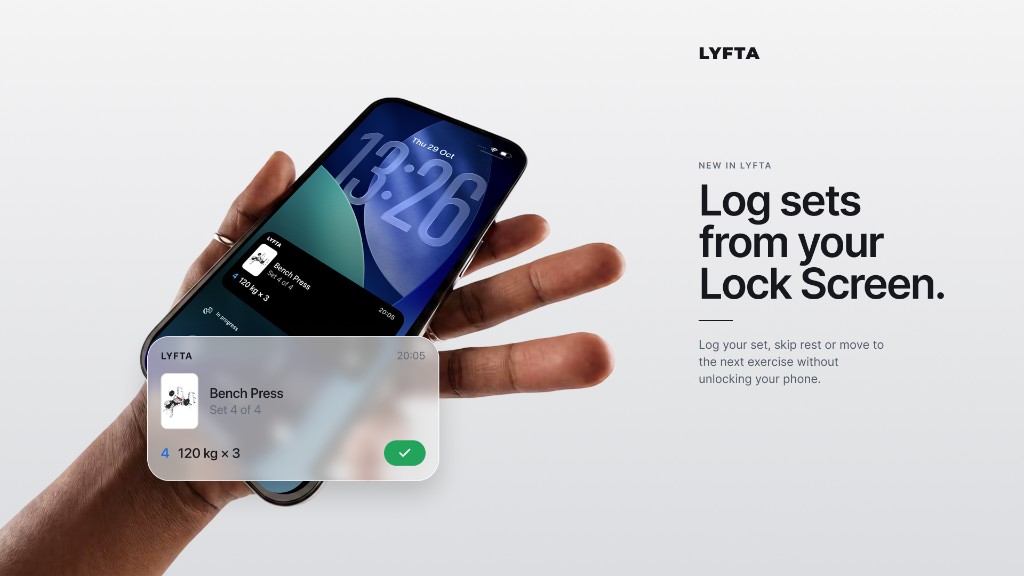
October lets you log a set from the Lock Screen, without unlocking your phone.

Log sets from your Lock Screen

The Live Activity on the Lock Screen has buttons to log a set, skip rest, or jump to the next exercise. You can keep the session going between sets without unlocking the phone. It is out now for everyone on 17.2 or later. Start a workout, lock the phone, and use the buttons on the Lock Screen.
Log sets from your Lock Screen

New & Improved

  • Share an achievement or a milestone, including from Apple Watch.
  • Compare progress photos side by side.
  • Lyfta runs on iPad.
  • Apple Watch shows live heart rate zones.
  • A profile can be private, with follow requests, and you can block or report someone.
  • A set can run for hours, including on Apple Watch.
  • The measurements experience is available for everyone.
  • Friend search suggests people as you type.
  • A Training tab holds your plans and calendar in one place.
  • Sign-up includes a Get Started video.
  • The app opens full screen and starts faster.

Bug Fixes

Every detail matters. We have added an extra layer of polish, refining the finer touches to deliver a smoother, more seamless experience.

View Notes
All

What's new in Lyfta: September 2026 product update

September lets you reply under a comment, send a photo in a chat, and start a routine from sets you already logged.

Reply under the comment you answered

You can reply to a comment, and the reply stays attached to that comment. A conversation about a set or a workout stays together instead of mixing into one long list. Open the comments on a workout, tap Reply, and send your answer.

Send a photo in a chat

A chat can include a photo. Use it when a lift, a setup, or a result is clearer as a picture than as a description. Open Messages, open the chat, and send the photo.

Start a routine from sets you already logged

A new routine can start from the sets you have already logged, and you can keep as many routines as you need. You get a draft of what you actually do, and you can change any set before it is saved. Create a routine in the Library, then keep the filled-in sets or edit them first.

New & Improved

  • A referral link can open Lyfta directly.
  • Followers and following lists were updated.
  • The message box in chat was refined.
  • Feature requests open in a signed-in page.

Bug Fixes

Every detail matters. We have added an extra layer of polish, refining the finer touches to deliver a smoother, more seamless experience.

View Notes
All

What's new in Lyfta: August 2026 product update

August makes Strava sharing a full step after the workout, and lets the calendar zoom out past a single month.

Post a strength workout to Strava

You can connect Strava, preview the activity, and post the workout. The activity can include your exercises, sets, and a Lyfta card, so the post shows the lifting session rather than a generic workout. Connect Strava in Settings, check the preview, then let finished workouts post automatically or send one yourself from the feed.

See years of training on the calendar

The overview calendar can show a month, a year, or several years. You can see a stretch of training instead of only the current week. Open the overview calendar and switch the range.

New & Improved

  • The warm-up calculator rounds to the plates and dumbbells you have.
  • React to a chat message with an emoji.
  • More languages are available.
  • A referral offer can appear when you open the app.
  • Lyfta Coach is listed in Settings.
  • Favorites and folders on an exercise match the iOS layout.

Bug Fixes

Every detail matters. We have added an extra layer of polish, refining the finer touches to deliver a smoother, more seamless experience.

View Notes
All

What's new in Lyfta: July 2026 product update

July turns the month into a short recap, and makes a profile photo easier to share.

Swipe through your month of training

You can swipe through a summary of the training you logged that month. The month is one recap, so you can look back without opening every session, and anyone with those sessions can open it. Open the monthly summary and swipe through the cards.

New & Improved

  • A profile photo opens in a viewer where you can share it, copy a link, or show a QR code.
  • The watch stays awake between sets, so the workout is still there when the rest ends.
  • The rest timer asks for notification permission once, instead of repeating the prompt.
  • A video added to a custom exercise is kept after it uploads.

Bug Fixes

Every detail matters. We have added an extra layer of polish, refining the finer touches to deliver a smoother, more seamless experience.

View Notes
All

What's new in Lyfta: June 2026 product update

June splits the plan and your library into their own tabs, collects workout photos on your profile, and can start a program with the week already planned.

See today's plan and start from one tab

The Workout tab holds the plan, the calendar, and a way to start now. You can see what is scheduled and begin today without opening the library first. Open the Workout tab, check the day, and start.

Find your routines in the Library

The Library holds your routines, exercise folders, and gyms. Filters keep that list short, so you can find a routine and get back to training. Open the Library tab and use the filter sheets.

Browse workout photos on your profile

Your profile has a gallery of photos from workouts. Pictures you added to sessions sit together, next to the training they came from. Open your profile and browse the gallery.

Start a program with the week already planned

Starting a program from Explore can set up the plan for you. The scheduled days are ready, so you do not rebuild the week by hand. Open a program in Explore and start it.

New & Improved

  • A referral code can give the person you invite a 30-day trial.
  • Program search suggests programs and keeps recent searches.
  • Volume graphs use rounded bars.
  • Danish, Norwegian, and Swedish copy was rewritten to sound more natural.

Bug Fixes

Every detail matters. We have added an extra layer of polish, refining the finer touches to deliver a smoother, more seamless experience.

View Notes
All

What's new in Lyfta: May 2026 product update

May asks how hard the session felt, shows where a lift ranks, and checks which muscles have recovered.

Rate how hard the workout felt

When you finish, you can rate how hard the workout felt, from 1 to 10, and add a photo or video. The rating stays with the session, next to the weight and the reps, so a heavy day is easier to tell apart later. On the finish screen, set RPE, then add a photo or video if you want one.

See where a lift ranks

A finished workout can show a strength ranking for the lifts you logged. You can see where a lift sits without working it out yourself. Finish the workout and read the ranking on the summary.

Check which muscles have recovered

Muscle recovery is on the overview for everyone, including work from secondary muscles. It estimates how ready each muscle is from the sets you logged over the last 7 days, so you can choose the next session with that in view. Open the overview and look at each muscle. It does not account for sleep, stress, or how hard a set felt.

New & Improved

  • You can preview a routine before you share it.
  • You can open a saved workout while you are offline.
  • Share cards cover more of the overview.
  • Program search uses the newer search.

Bug Fixes

Every detail matters. We have added an extra layer of polish, refining the finer touches to deliver a smoother, more seamless experience.

View Notes
All

What's new in Lyfta: April 2026 product update

April reminds you on the days you train, shows which muscles are ready, and puts a training calendar on your home screen.

Get a reminder on the days you train

You can set a reminder for the days you train. Lyfta notifies you at that time, so the session is on the lock screen instead of depending on you remembering it. Turn it on during onboarding, or later in Settings.

See which muscles are ready to train

The overview shows how recovered each muscle group is from the sets you have logged. You can see what is ready before you plan the next session. Open the overview, then open a muscle to see why it is ready or still tired.

Put a training calendar on your home screen

A calendar-only widget can sit on the home screen. Training days stay visible without opening Lyfta or the rest of the month snapshot. Add the widget from your home screen.

New & Improved

  • The feed can open from what is already on the phone when there is no connection.
  • Unblock someone from Settings.
  • Norwegian is available.
  • The support center opens inside the app.
  • Explore leads with Programs, then Exercises, then Coaches.
  • How-to-log copy for leverage machines distinguishes a stack from plate-loaded.

Bug Fixes

Every detail matters. We have added an extra layer of polish, refining the finer touches to deliver a smoother, more seamless experience.

View Notes
All

What's new in Lyfta: March 2026 product update

March adds a way to message people in Lyfta, and keeps the rest timer on your watch in step with the phone.

Message someone in Lyfta

You can message someone from Lyfta. The conversation shows when they are typing and which messages have been read, so you know the chat is moving. Open Messages and start the chat.

Run the rest timer from your watch

The rest timer stays in sync between the phone and the watch, including left and right sets. Starting, pausing, or finishing the rest on one updates the other, so you can leave the phone down between sets. Start the rest on either device and the other follows.

New & Improved

  • A workout posted to Health Connect can include the stats from the session.
  • Change the email address on your account from Settings.
  • The watch rest timer keeps the screen available and vibrates when the rest ends.

Bug Fixes

Every detail matters. We have added an extra layer of polish, refining the finer touches to deliver a smoother, more seamless experience.

View Notes
All

What's new in Lyfta: February 2026 product update

February restores workout export. The file you share now contains the sessions.

Bug Fixes

Every detail matters. We have added an extra layer of polish, refining the finer touches to deliver a smoother, more seamless experience.

View Notes
All

What's new in Lyfta: January 2026 product update

January tells you before a trial runs out, so the end of the trial is not a surprise.

New & Improved

  • A screen appears before a trial ends and shows the date it stops.

Bug Fixes

Every detail matters. We have added an extra layer of polish, refining the finer touches to deliver a smoother, more seamless experience.

View Notes
All

What's new in Lyfta: November 2025 product update

November brings the year in review up to date for 2025, and lets you share the month as a card.

Look back at your 2025 training

The 2025 year in review collects the training you logged this year, including your streak, the months you trained, and your top exercises. You can see the year before it ends, without adding the sessions up yourself. Open it from the feed.

New & Improved

  • Share cards are available for a month's stats.
  • Offers can change without an app update.

Bug Fixes

Every detail matters. We have added an extra layer of polish, refining the finer touches to deliver a smoother, more seamless experience.

View Notes
All

What's new in Lyfta: October 2025 product update

October rebuilds Explore around programs, exercises, and coaches, lets a custom exercise include a video, and opens Lyfta Coach from the app.

Browse programs, exercises, and coaches

Explore was rebuilt around programs, exercises, and coaches. You can browse for a plan without hunting through the old layout. Open Explore and move through those sections.

Add a video to an exercise you created

You can add a video to an exercise you created. The demonstration stays on that exercise, so the cue is there the next time you log it. Edit the exercise and add the video.

Open Lyfta Coach from the app

Lyfta Coach opens from the app. The coach screen is one tap away, instead of a website you have to find on your own. Open Lyfta Coach from inside Lyfta.

New & Improved

  • Delete a scheduled workout you no longer want.
  • Live personal records on the watch were updated.
  • Lyfta can ask for a rating after you have used the app.

Bug Fixes

Every detail matters. We have added an extra layer of polish, refining the finer touches to deliver a smoother, more seamless experience.

View Notes
All

What's new in Lyfta: September 2025 product update

September puts upcoming sessions on the calendar and makes two profiles easier to compare.

Put a workout on a future day

You can put a workout on a future day. Planned days stay in sync with the web, so the phone and the browser show the same plan. Pick a day and add the workout to it.

Compare two profiles side by side

You can compare two profiles on one screen. Their training lines up side by side, so you do not have to flip between profiles to see the difference. Open a profile and start the comparison.

New & Improved

  • The overview graph was redrawn, so volume and progress are easier to read.
  • The log workout guide was rewritten.
  • Share cards were updated, including a transparent card you can save.

Bug Fixes

Every detail matters. We have added an extra layer of polish, refining the finer touches to deliver a smoother, more seamless experience.

View Notes
All

What's new in Lyfta: August 2025 product update

August marks long-running milestones and makes it easier to share a profile or pick the next weight.

Earn a badge for a long run of training

Milestone badges mark longer stretches of training. They stay with your other achievements once you earn them, so a long run of work is still visible later. Open your achievements to see the ones you have earned.

Follow someone by scanning a QR code

You can share a QR code for your profile, or scan someone else's. You can follow a person next to you without searching for their name. Show your code, or scan theirs.

Get a suggested weight while you log

A suggested weight can appear on the keyboard while you log. It is a starting number from what you have lifted, and you can still type your own if today is different. Open the weight field and use the suggestion, or replace it.

New & Improved

  • The overview has a section for personal records.
  • You can share the overview, including larger share cards.
  • Suggested friends appear when you want to find people.
  • The feed has a community button.

Bug Fixes

Every detail matters. We have added an extra layer of polish, refining the finer touches to deliver a smoother, more seamless experience.

View Notes
All

What's new in Lyfta: July 2025 product update

July moves health sync fully onto Health Connect.

New & Improved

  • Finished workouts post through Health Connect, and the Google Fit connection is gone.
  • The app is updated for newer Android versions.

Bug Fixes

Every detail matters. We have added an extra layer of polish, refining the finer touches to deliver a smoother, more seamless experience.

View Notes
All

What's new in Lyfta: June 2025 product update

June adds a calorie estimate to the work you logged, and makes comments and progress photos easier to use.

See estimated calories for the session

A finished session can show estimated calories. You get a rough energy cost next to the sets, without opening a separate calculator. Finish the workout and read the estimate on the summary.

New & Improved

  • You can like a comment and add an emoji.
  • You can pinch a progress photo to look closer.
  • Heart rate on Wear OS was updated.
  • Promo codes are checked by the server.
  • The overview can sit behind Premium.

Bug Fixes

Every detail matters. We have added an extra layer of polish, refining the finer touches to deliver a smoother, more seamless experience.

View Notes
All

What's new in Lyfta: May 2025 product update

May sums up the week and shows the record while the set is still in front of you.

Read your week in one report

A weekly report collects the sessions from the week. You can see the work you did without opening each day one by one. Open the report at the end of the week.

See a personal record while you log the set

Stats and personal records update while you train. A new best shows up when you log the set, not only after you finish, so you know it happened in the session. Log the set and check the record on the workout screen.

New & Improved

  • Share cards are available on an exercise.
  • Change the date of a progress photo, or delete one.
  • Ukrainian is available.
  • Beta features can be turned on from a toggle.
  • Exercises are loaded from the web, so the library stays current.

Bug Fixes

Every detail matters. We have added an extra layer of polish, refining the finer touches to deliver a smoother, more seamless experience.

View Notes
All

What's new in Lyfta: April 2025 product update

April saves progress photos with your training, shows a friend's streak next to yours, and lets you share a routine as a card.

Save progress photos next to your training

You can add a progress photo and keep it with your training. The picture sits next to the months of logged work, so the change is easier to see than in the camera roll alone. Add a photo, then come back to it as the months add up.

See a friend's streak next to yours

You can see a friend's streak next to your own. Days you both trained are visible without opening each profile. Open the streak view and compare the two.

Share a routine as a card

You can share a routine as a card. Someone else can see the exercises you built without you typing them into a message. Open the routine and share the card.

New & Improved

  • The support center is inside the app, so you can read help and send a request without leaving Lyfta.
  • Onboarding can ask which muscles you want to train.
  • The feed and the library open faster.
  • The streak calendar scrolls with less delay.
  • Tapping a like or comment notification opens the comments.

Bug Fixes

Every detail matters. We have added an extra layer of polish, refining the finer touches to deliver a smoother, more seamless experience.

View Notes
All

What's new in Lyfta: March 2025 product update

March gives the month a clearer ending, and marks the milestones along the way.

Earn a badge for a training milestone

You can earn badges as you train. A milestone stays on your profile after the session that unlocked it, so the mark is still there later. Open your profile to see the badges you have reached.

Look back at the month in one recap

The monthly recap was rebuilt as one summary of the month. You can look back without scrolling every workout. Open the recap when the month is done.

New & Improved

  • You can copy the sets, reps, and weight from a workout into a message.
  • The home screen calendar widget was updated.
  • Cancelling a subscription or deleting an account asks why, so the reason is recorded.
  • Share links record that they were opened.

Bug Fixes

Every detail matters. We have added an extra layer of polish, refining the finer touches to deliver a smoother, more seamless experience.

View Notes
All

What's new in Lyfta: February 2025 product update

February shows your training streak, lets you invite a friend, sends workouts to Samsung Health, and fills in the weight from last time.

See how many days in a row you have trained

Your training streak shows how many days in a row you have trained. It is there after a workout, so the next session is easy to keep in view. Check it where the streak is shown after you finish.

Invite a friend from the app

You can invite someone to Lyfta from inside the app. You do not have to copy a link out of Settings and send it yourself. Open the invite and share it.

Send a workout to Samsung Health

Lyfta can connect to Samsung Health. Finished workouts can then sit with the rest of your Samsung health data, so you do not log the session twice. Open the Samsung Health screen and connect it.

Fill in the weight from last time

You can change a previous set while you are still logging, and a routine can fill in the weight and reps from last time. You spend less time retyping the same numbers at the start of a session. Edit the earlier set in the open workout, or start the routine and keep the filled-in values.

New & Improved

  • You can pin a note so it stays at the top of an exercise.
  • Pause the workout from a dialog when you need to stop the clock.

Bug Fixes

Every detail matters. We have added an extra layer of polish, refining the finer touches to deliver a smoother, more seamless experience.

View Notes
All

What's new in Lyfta: January 2025 product update

January counts left and right as one set, lets a finished session include video, and connects Garmin.

Count left and right as one set

Left and right sides can count as one set. Volume and records stay honest when you train one arm or one leg at a time, instead of counting that work twice. Mark both sides as the same set while you log.

Add a video to a finished workout

You can add a video to a workout. The session can show how it looked, not only the table of sets. Add the video when you finish, or when you edit a past workout.

Connect your Garmin account

Lyfta can connect to Garmin. Once the accounts are linked, Lyfta knows which Garmin account is yours. Open Settings and connect Garmin.

New & Improved

  • A Leaderboard tab is available.
  • You can skip parts of onboarding.
  • Wear OS logging was updated.
  • A promo offer can arrive as a notification.
  • Warm-up volume can be hidden on a finished workout when that setting is off.

Bug Fixes

Every detail matters. We have added an extra layer of polish, refining the finer touches to deliver a smoother, more seamless experience.

View Notes
All

What's new in Lyfta: December 2024 product update

December looks back at the year you trained, puts a calendar on your home screen, lets you log a rep range, and keeps the rest timer on the lock screen.

Look back at your year of training

Your year in review brings together your streak, the months you trained, and the exercises you logged most. You can see the year without adding the sessions up yourself. Open it from the feed.

Put your training calendar on the home screen

A month calendar can sit on your home screen. The days you trained stay visible, so you can check the week without opening Lyfta. Add the widget from your home screen.

Log a set as a rep range

A set can use a rep range, such as 8–12, instead of one fixed number. The log stays closer to how the set was programmed, and you can still record the reps you actually did. Enter the range when you log the set.

Watch the rest timer from the lock screen

The rest timer and a workout in progress can stay in a notification. You can see the rest counting down without unlocking the phone between sets. Keep the workout notification on, and set a separate rest time for warm-up sets if you use one.

New & Improved

  • Strava sign-in was updated.
  • A routine shows the last day you performed it.
  • Exercises can include an emoji.
  • Share cards were updated.

Bug Fixes

Every detail matters. We have added an extra layer of polish, refining the finer touches to deliver a smoother, more seamless experience.

View Notes
All

What's new in Lyfta: November 2024 product update

November is about sharing a lift and getting into the log faster.

Share a lift next to something its size

A share card puts the weight you lifted next to something of a similar size, such as an animal or a vehicle. A heavy set is easier for someone else to understand, and easier to send. Open the card for a lift and share it.

New & Improved

  • Each exercise has a How to log button, so you can check how to record the set before the first rep.
  • Lyfta opens your workouts sooner.
  • Premium lists its benefits more clearly.
  • The exercise library was updated.
  • Onboarding asks how you heard about Lyfta.

Bug Fixes

Every detail matters. We have added an extra layer of polish, refining the finer touches to deliver a smoother, more seamless experience.

View Notes
All

What's new in Lyfta: October 2024 product update

October makes it easier to share a session you just finished, and adds promo codes.

Share a workout the way you logged it

A finished workout can be shared as it was logged. You can show the session, including the sets, reps, and weight, without typing them out again. Open the workout summary and share it.

New & Improved

  • You can redeem a promo code from your profile.
  • More of the app is translated.
  • Menus that used to take a full screen now open as sheets.
  • Collections can list more routines.

Bug Fixes

Every detail matters. We have added an extra layer of polish, refining the finer touches to deliver a smoother, more seamless experience.

View Notes
All

What's new in Lyfta: September 2024 product update

September is about the bar and the library. You can see which plates to load, start without a saved routine, and share a routine on Explore.

See which plates to load on the bar

The plate calculator shows which plates to load for the weight you want. You spend less time doing the math between sets. Enter the target weight, mark the plates you have, and read the load in kilograms or pounds.

Start training without a saved routine

You can start training from the library without opening a saved routine first. That helps when the session changes once you are at the gym. Tap Workout, then add exercises as you go.

Share a routine on Explore

You can share a routine or a collection to Explore. Other people can find a workout you built, instead of it staying only on your phone. Open the routine or collection and share it to Explore.

New & Improved

  • You can choose which day your week starts, so calendars match how you plan training.
  • You can add Instagram, TikTok, and YouTube on your profile.
  • Wear OS and the bottom navigation were updated.
  • A weekly Premium option is available.
  • The finish screen shows clearer workout stats.

Bug Fixes

Every detail matters. We have added an extra layer of polish, refining the finer touches to deliver a smoother, more seamless experience.

View Notes
All

What's new in Lyfta: August 2024 product update

August makes weight units consistent, and can suggest a workout from how long you have and which muscles you want to train.

Keep every weight in kilograms or pounds

You can choose kilograms or pounds and keep that unit everywhere. Logging, history, the feed, progress graphs, and the weekly recap then match, so a new session is easy to compare with the last one. Set your weight unit before you log.

Get a workout from your time and muscles

Lyfta can suggest a session from how long you have and which muscles you want to train. That gives you a place to start on days you do not already have a routine. Set the time and the muscles, then start the suggested workout.

New & Improved

  • A short video shows how to start your first session.
  • The app icon adapts to your home screen.
  • Routine options open in a clearer sheet.

Bug Fixes

Every detail matters. We have added an extra layer of polish, refining the finer touches to deliver a smoother, more seamless experience.

View Notes
All

What's new in Lyfta: July 2024 product update

July connects Lyfta to Health Connect and adds a female body to the muscle maps.

Send a finished workout to Health Connect

Finished workouts can be posted to Health Connect. Your strength sessions then sit with the rest of your health data, so you do not have to log the same workout in a second app. Connect it in Settings, then send the session from the finish screen.

See muscles on a female body map

Muscle maps now include a female body, front and back. The muscles an exercise trains are easier to recognize on the body you train with. Open an exercise and look at the map.

New & Improved

  • Health Connect can be connected or disconnected from Settings.
  • The finish-workout screen can send the session you just logged.
View Notes
All

What's new in Lyfta: June 2024 product update

June polished the Wear OS app after review and made it easier to start a workout on the phone.

Start a workout from the library

A start workout button sits where you choose what to train. You can log the first set without searching through saved routines. Tap Start workout, then record the set.

New & Improved

  • Text on the watch is larger, and longer screens scroll.
  • Images render faster while you browse exercises and the feed.
  • Workout screens stay smoother while a session is open.
View Notes
All

What's new in Lyfta: May 2024 product update

Lyfta now runs on Wear OS. May also refreshed the workout calendar and made images load faster.

Log a workout from your watch

Lyfta runs on Wear OS. You can log the session from your wrist and leave the phone down between sets. Open the workout on the watch to see the exercises, run the rest timer, and sync the session back to your phone.

New & Improved

  • Training days stand out more clearly on the calendar, so a missed day is easier to spot.
  • Exercise images load faster.
  • Feed layouts were tightened up.

Bug Fixes

Every detail matters. We have added an extra layer of polish, refining the finer touches to deliver a smoother, more seamless experience.

View Notes
Android

What's new in Lyfta: Best lift product update

April highlights your best lift in an exercise, and adds What's New and About in Settings.

See your best lift in the exercise history

The exercise history marks your highest 1RM. You can see the best lift without scanning every session. Open an exercise and check the history.

Lyfta Update - Performance Tracking Enhancement

New & Improved

  • Settings includes What's New and About.

Bug Fixes

Every detail matters. We have added an extra layer of polish, refining the finer touches to deliver a smoother, more seamless experience.

View Notes
iOSVersion 1.54

What's new in Lyfta: Version 1.54 product update

April adds a weekly progress recap, and a redesigned workout library.

Read your week in one recap

The feed can show a recap of the week you just trained. You can see what you finished without opening each workout. Check the feed for the weekly recap.

Find routines in a redesigned library

The workout library has a new layout. Routines are easier to scan, so you can start the next session with less searching. Open the library and pick a routine.

Lyfta App Update - Enhanced Workout Library

New & Improved

  • Smaller interface details were cleaned up across the app.

Bug Fixes

Every detail matters. We have added an extra layer of polish, refining the finer touches to deliver a smoother, more seamless experience.

View Notes
Android

What's new in Lyfta: Weekly recap product update

April adds a weekly progress recap in the feed, and a redesigned workout library.

Read your week in the feed

The feed can show a recap of the week you just trained. The work is in one place, so you do not add it up from each session. Open the feed and read the weekly recap.

Lyfta App's Latest Features

Find routines in a redesigned library

The workout library has a new layout. Routines are easier to scan and open. Open the library and pick the next session.

New & Improved

  • Navigation through the app was cleaned up.

Bug Fixes

Every detail matters. We have added an extra layer of polish, refining the finer touches to deliver a smoother, more seamless experience.

View Notes
iOSVersion 1.53

What's new in Lyfta: Version 1.53 product update

April improves how the app runs, and fixes bugs found in this release.

Lyfta App Update Version 1.53

New & Improved

  • Everyday use is smoother after the performance work in this release.

Bug Fixes

Every detail matters. We have added an extra layer of polish, refining the finer touches to deliver a smoother, more seamless experience.

View Notes
Android

What's new in Lyfta: Google Fit product update

April sends a finished workout to Google Fit.

Send a workout to Google Fit

A finished session can sync to Google Fit. Strength work then sits with the rest of your health data, so you do not log the same workout in a second app. Open Settings, connect Google Fit, and finish a workout.

Google Fit Integration
View Notes
Android

What's new in Lyfta: Notes, live graph, and warm-up sets product update

March puts more of the session on the log itself: what you noticed, how the weight is moving, and the warm-up before the work sets.

Exercise notes

Write a note on an exercise inside the workout. Next time you open it, the cue you left yourself is still there.

Live graph

A graph updates while you log. You can see the set you just finished against the ones before it, without waiting until the summary.

Warm-up sets

Add warm-up sets to the workout. The ramp-up is part of the log, separate from the working sets you want to track.

New & Improved

  • The rest timer can vibrate for longer after it ends.
  • Connect with Friends is easier to use.
  • Workout names use your local time, so a late session stays on the day you trained.

Bug Fixes

Every detail matters. We have added an extra layer of polish, refining the finer touches to deliver a smoother, more seamless experience.

View Notes
iOSVersion 1.51

What's new in Lyfta: Version 1.51 product update

March adds Ukrainian.

Use Lyfta in Ukrainian

The app can run in Ukrainian. Workout screens follow that language. Switch the language and the interface updates.

Lyfta Update - Ukrainian Language Support

New & Improved

  • Small interface details were cleaned up.

Bug Fixes

Every detail matters. We have added an extra layer of polish, refining the finer touches to deliver a smoother, more seamless experience.

View Notes
iOSVersion 1.50

What's new in Lyfta: Version 1.50 product update

March smooths the signup screens, and fixes the workout generator.

Move through signup with less friction

The signup screens were redrawn. Creating an account takes fewer confusing steps, so you can get to the first workout sooner. Start signup and follow the updated screens.

Lyfta App Update - AI Enhancement and UI Polish

Bug Fixes

Every detail matters. We have added an extra layer of polish, refining the finer touches to deliver a smoother, more seamless experience.

View Notes
iOSVersion 1.49

What's new in Lyfta: Version 1.49 product update

March adds an assistant in the app, and keeps the rest timer in step with Apple Watch.

Ask the assistant for help

An assistant is available in the app. You can ask for help with the workout in front of you instead of leaving Lyfta to look it up. Open the assistant and ask from there.

Lyfta iOS Update - New Features in Version 1.49

Keep the rest timer in step with Apple Watch

The rest timer stays aligned with Apple Watch. The countdown on your wrist matches the phone, so you are not waiting on two different clocks. Start the rest on either one and both follow it.

New & Improved

  • The interface is cleaner and easier to move through.
  • The app responds faster in everyday use.
View Notes
iOSVersion 1.48

What's new in Lyfta: Version 1.48 product update

March adds Apple Watch, so a workout can run from the wrist.

Log from Apple Watch

Lyfta connects to Apple Watch. You can follow the session from your wrist and keep the phone down between sets. Open the workout on the watch and log from there.

Lyfta iOS Update - Apple Watch Support

Bug Fixes

Every detail matters. We have added an extra layer of polish, refining the finer touches to deliver a smoother, more seamless experience.

View Notes
Android

What's new in Lyfta: Pause a workout product update

February gives you more control while a session is open, and a short guide for building a routine.

Pause, play, and stop

Pause the workout, resume it, or stop it from the log. You can step away without losing the sets you already checked.

Notes while you log

Add a note on the session as you train. The detail stays with that workout instead of living in a separate app.

Routine guide

A routine guide shows how to put a workout together. Empty collections explain what to do next instead of leaving a blank screen.

New & Improved

  • Program descriptions in Explore can be expanded and collapsed.
  • Exercise images load at a size that matches the screen.
  • The Explore layout scrolls with less nesting, so long lists feel steadier.

Bug Fixes

Every detail matters. We have added an extra layer of polish, refining the finer touches to deliver a smoother, more seamless experience.

View Notes
iOSVersion 1.47

What's new in Lyfta: Version 1.47 product update

February posts a workout to Strava from the feed.

Post a workout to Strava from the feed

A finished workout can go to Strava from the feed. The strength session shows up with your other training, without a separate upload later. Open the workout in the feed and post it to Strava.

Update 1.47 Features - Strava Integration

Bug Fixes

Every detail matters. We have added an extra layer of polish, refining the finer touches to deliver a smoother, more seamless experience.

View Notes
iOSVersion 1.46

What's new in Lyfta: Version 1.46 product update

February adds more exercise videos, a larger exercise library, and Vietnamese and Turkish.

Watch more exercise videos

The library includes a much larger set of exercise videos. You can check the movement before you load the bar, instead of relying on the name alone. Open an exercise and play the video.

Lyfta App Update - More Videos and New Languages

Train with a larger exercise library

More than a thousand exercises were added. When the usual movement is taken, there is another option in the library. Search the library and add the exercise to the workout.

Use Lyfta in Vietnamese or Turkish

The app can run in Vietnamese or Turkish. Switch the language and the screens follow it.

Bug Fixes

Every detail matters. We have added an extra layer of polish, refining the finer touches to deliver a smoother, more seamless experience.

View Notes
iOSVersion 1.45

What's new in Lyfta: Version 1.45 product update

February adds Favorites, a way to share the workout you are logging, and French.

Save an exercise to Favorites

An exercise you repeat can be saved to Favorites. The next session is faster to build because those movements are already collected. Save an exercise, then add it from Favorites the next time you log.

Lyfta Update - New Features in Version 1.45

Share a workout while you log

You can share the workout while the session is still open. Someone else can see what you are doing without waiting for a summary later. Share it from the workout you are logging.

Use Lyfta in French

The app can run in French. Switch the language and the screens follow it.

Bug Fixes

Every detail matters. We have added an extra layer of polish, refining the finer touches to deliver a smoother, more seamless experience.

View Notes
iOSVersion 1.44

What's new in Lyfta: Version 1.44 product update

January adds Dutch.

Use Lyfta in Dutch

The app can run in Dutch. Screens and workout labels follow that language. Switch the language and the interface updates.

Version 1.44 Update - Dutch Language Support

Bug Fixes

Every detail matters. We have added an extra layer of polish, refining the finer touches to deliver a smoother, more seamless experience.

View Notes
iOSVersion 1.43

What's new in Lyfta: Version 1.43 product update

January adds Arabic, German, and Swedish.

Use Lyfta in Arabic, German, or Swedish

The app can run in Arabic, German, or Swedish. The workout screens follow the language you pick, so logging does not depend on English. Switch the language and continue in that one.

Lyfta Update 1.43 - Multilanguage Support

Bug Fixes

Every detail matters. We have added an extra layer of polish, refining the finer touches to deliver a smoother, more seamless experience.

View Notes
iOSVersion 1.42

What's new in Lyfta: Version 1.42 product update

January adds full Spanish, so the app can be used in that language.

Use Lyfta in Spanish

The app can run in Spanish. Labels, screens, and the workout flow follow that language, so you do not have to translate as you log. Switch the language in the app and the interface updates.

App update - Spanish language support

Bug Fixes

Every detail matters. We have added an extra layer of polish, refining the finer touches to deliver a smoother, more seamless experience.

View Notes
iOSVersion 1.41

What's new in Lyfta: Version 1.41 product update

January adds a muscle description to each exercise, so you can see what a movement trains.

See which muscles an exercise uses

Each exercise can include a description of the muscles it trains. You can check the target before you start the set, instead of guessing from the name. Open an exercise and read the muscle description.

Lyfta iOS Update - Enhanced Exercise Details

Bug Fixes

Every detail matters. We have added an extra layer of polish, refining the finer touches to deliver a smoother, more seamless experience.

View Notes
Android

What's new in Lyfta: Strava product update

September connects Lyfta to Strava so a strength session can post with your other training.

Connect Strava

Lyfta can link to your Strava account. A strength workout can then sit next to the rest of your training, instead of staying only in Lyfta. Open Settings and connect Strava.

Lyfta and Strava Integration
  1. Open Settings.
  2. Select Strava and connect the account.
View Notes
iOSVersion 1.34

What's new in Lyfta: Version 1.34 product update

September sends a finished workout to Apple Health.

Send a workout to Apple Health

A finished session can sync to Apple Health. Strength work then sits with the rest of your health data, so you do not log the same workout in a second place. Connect Apple Health, finish a workout, and the session can sync across.

Lyfta iOS Update - Apple Health Integration

New & Improved

  • The app runs more smoothly in everyday use.
View Notes
iOS

What's new in Lyfta: Import, export, and rest timer product update

September lets you move workout data in and out of Lyfta, and counts down the rest between sets.

Move workout data in and out

You can import a workout file and export the log you already have. The history is not stuck in the app, and a file from somewhere else can come in with you. Use import and export from the app when you want the file.

Lyfta iOS New Features Update

Count down the rest between sets

The rest timer counts down while you wait. You can see how much time is left without guessing. Start the timer after a set and wait for it to finish.

Bug Fixes

Every detail matters. We have added an extra layer of polish, refining the finer touches to deliver a smoother, more seamless experience.

View Notes
iOS

What's new in Lyfta: Replace an exercise product update

August lets you replace an exercise while a workout is open.

Replace an exercise while you log

You can swap an exercise without leaving the session. The rest of the workout stays as you logged it, and the new movement takes that slot. Open the exercise in the log and replace it.

Lyfta iOS Update

New & Improved

  • The interface is cleaner, so the next control is easier to find.

Bug Fixes

Every detail matters. We have added an extra layer of polish, refining the finer touches to deliver a smoother, more seamless experience.

View Notes
Android

What's new in Lyfta: Exercise progress graphs product update

July redraws the exercise progress graph so the history is easier to read.

Read your progress on a clearer graph

The exercise graph shows more of the work you have logged, and it is easier to switch what you are looking at. Open an exercise and check the progress graph.

Exercise Progress Graphs Design Update
  1. Clearer graphs, so the line is easier to follow.
  2. More of the history on the same chart.
  3. Views you can change, so the chart shows the numbers you care about.
  4. Faster switching between graph types.
View Notes
Android

What's new in Lyfta: Import workouts product update

June lets you bring workouts in from another app, and send your own log out as a file.

Bring workouts in from another app

A history from Strong, Hevy, Fitnote, or a similar app can move into Lyfta. The sessions you already logged stay with you, instead of starting the graph over. Open Settings and import the CSV file from that app.

Data Import Feature Overview
  1. Open Settings.
  2. Tap Import Data.
  3. Choose the app the file came from.
  4. Upload the CSV file.
  5. Wait for Lyfta to add the workouts to your account.

Send your log out as a file

You can export your workouts to a CSV file. Open the file in a spreadsheet, or keep a copy outside the app.

View Notes